

5 Pro Features Even Top Medium Authors Overlook
How to let Medium do all the heavy lifting for you


I’ve published 1270 stories on Medium and I manage six publications under the Alchemy umbrella. Despite being a top author on Medium, I am continually learning as I read and write.
With more influence comes more responsibility, and I’m always happy to share everything I’ve learned with my friends and fellow authors in this writing chain.
Those of you who know my work as an editor of Alchemy are also aware of my belief in the power of community.
I’ve said it many times, but it’s never enough to repeat it.
A chain is only as strong as its weakest link, and if we want our writing community to grow stronger, we have to care for the newest links in the chain.
Caring for others means sharing with them what you’ve learned.
I hold no grudge against those who write to navel gaze and sell courses about how to succeed in the content economy, even if it’s fool’s gold what most of them have to offer.
Don’t let yourself be fooled; there aren’t any shortcuts in this babel of content.
You can’t just go around cutting corners and expect to succeed. That’s why my approach is inspired by the laws of karma and based on an entirely altruistic mindset.
In four years, every cent I’ve made here has come exclusively from the Partner Program and a couple of tips I’ve received.
Not once have I charged anything for advice.
I provide it for free to all of you reading my stories or working with our team at any of our Alchemy Publications.
These days, I spend little time writing stories that could make me more money. Instead, most of my time is dedicated to helping other writers grow.
I even lose track of the hours of pro bono work I put in every single day, but I can assure you that this routine keeps me up until very late in the evening.
So, my ultimate goal is to serve the servants and help those who are genuinely committed to being strong links in the chain.
Are you as passionate about crafting stories with your readers in mind as I am?
If you’re nodding your head, you’re in for a real Christmas treat, as there are some gold nuggets to be found below.
If you’re still missing a present or two, this holiday season, you can gift a subscription of Engage to your family and friends.
Now let me ask you something.
Have you ever felt like you’re only scratching the surface of what Medium can do for your writing?
Well, you’re not alone.
In my years as an editor, I’ve come to realize it’s easy to get caught up in the basics and overlook some of the platform’s less-known features.
Medium, with its sleek design, was built with a singular purpose in mind. To ensure there’s no barrier between you and your written word.
Thanks to a slick and super-simple editor, writing on Medium can become a highly rewarding experience.
I am not even using MS Word anymore; I find myself typing on the editor even pieces of writing that aren’t meant for online distribution.
I’ve even typed here some of the poems that will be included in my upcoming Portuguese poetry opus.
Sorry, I digress.
Today, my goal is to highlight five essential but frequently overlooked features on Medium.
So next time you write a story, see if you can remember these seldom-used off-the-shelf bits. a story, see if you can remember these seldom-used off-the-shelf bits.
1. Creating a photo gallery
If there’s one thing I value besides engaging writing, it’s the power of an eye-catching image.
Even the latest update to Medium’s quality guidelines emphasizes the importance of images.
Ideally, images, if any, add value to the story.
But what if I told you there’s a lot more you can do with your visuals to increase readership?
It’s quite common to see images sprinkled across a story, but seeing beautifully crafted photo galleries on Medium that beautifully complement the author’s writing.
But, well, that's a different story.
It’s easy to forget that you can go beyond single-picture mode and seamlessly build galleries.
Medium does all the heavy lifting for you.
Medium’s standard style guide recommends including at least one featured image in our stories.
Yet, did you know that when uploading images, you can select more than one? This allows you to create cool image layouts.
As you increase the number of images you want to include, Medium will automatically arrange them in a stylish layout.
There is no need to fiddle with complex formatting or worry about alignment issues; Medium makes it simple and elegant.
If you don’t like how the images are displayed, you can even drag them around to rearrange them as you see fit.
If you unleash your creative energy, I bet you’ll end up with some cool galleries for your best photos, framed in a cool way.
For instance, using photo galleries is ideal for those travel articles where you showcase stunning landscapes.
If you’re into cooking, you can share your favorite recipes with step-by-step cooking visuals or take a deep dive into a historical event with relevant photos.
These are just a few examples of how a photo gallery can engage your readers on a whole new level.
2. Linked images
While writing online, you want to imprint your unique voice in the hearts of your readers.
That’s how you grow an audience and entice your readers to walk with you down the yellow brick road.
A writer is also an entertainer, and the best way to do this in the age of AI is to let the readers know more about you.
Your human side matters. So it’s always good to cross-pollinate your digital presence across several platforms.
How do I do this?
With calls to action.
Any writer working on someone else’s platform needs to take a step forward and think ahead.
Platforms come and go. We’ve seen this happen countless times. Medium is thriving, but there’s nothing wrong with planning your future.
The best way to ensure your readers will be able to find you anywhere in the metaverse is to grow a mailing list.
Medium has a subscribe feature, which is great. It even allows you to import and export subscribers. Even better!
Still, there are other ways to entice your readers to follow you deeper down your rabbit hole.
On Medium, you can use an image that serves as your clickable call to action.
Maybe it’s a “Subscribe Now” image or a “Read More” banner.
Once you’ve got that image ready, you can easily add a hyperlink to it.
It’s as simple as hitting “⌘” + “K” on a Mac or “control” + “K” on a Windows machine.
This opens up the hyperlink box, where you can insert your desired link.
Easy-peasy, right?
Now, let’s talk about real-world applications.
Scroll down a bit in this very article, and you’ll see how I’ve used a linked image to encourage you to subscribe to Engage’s newsletter.
It’s a subtle yet effective way to guide your readers without those custom buttons.
But that’s not all—you can also use linked images for story navigation. Imagine creating a series of interconnected stories and using images as clickable links to take your readers on a new reading experience across the maze of your content.
I’ve been thinking about creating a system similar to "Choose Your-Own-Adventure” within my Medium stories.
I’ll let you know more about that in a follow-up to this piece, so if you haven’t, I invite you to stay in touch by subscribing here.
3. TK Notes
Writing in long form can be a pain to edit. Tackling those long stories can be frustrating.
You probably know how hard it is to finish a piece in one sitting.
Long-form content is a beast of its own. It requires meticulous planning, research, and hours of writing.
That’s where the struggle begins—remembering what’s left incomplete, where you wanted to add an insightful quote, or which section needs a bit more love.
Just type TK anywhere in the editor and this will automatically set a TK note.
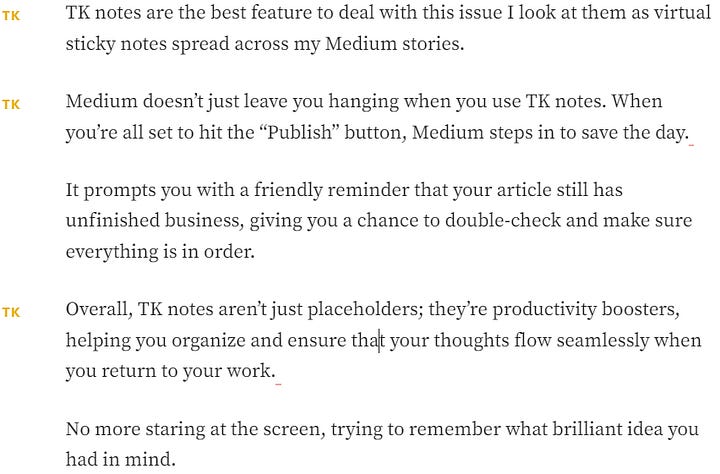
Typing TK also makes sure your story doesn’t get accidentally published. You’ll be prompted to confirm if you want to publish the story with the TK notes still in place.
4. Adding alt-text to images
There are several pillars to a seamless reading experience, and one of the most important is accessibility.
For me, accessibility is more than a buzzword. I see it as part of a more responsible and inclusive approach to writing.
Enhanced accessibility ensures your content can be enjoyed by a wider audience, including those afflicted by any type of visual restriction.
By providing alt text for your images, you’re opening the door to readers who rely on screen readers to navigate the web.
I find this a simple but powerful way to make your content more inclusive.
On Alchemy publications, we always remind our writers to pay attention to alt-text.
Adding alt text isn’t just a noble gesture; it has real benefits:
Enhanced understanding: Alt text provides context to your images, allowing all readers to better understand your content.
Accessibility: Screen readers use alt text to describe images to users with visual limitations of any sort, ensuring they can fully engage with your content.
SEO Boost: Search engines use alt text to understand the content of your images, potentially improving your search engine rankings.
Adding alt text to images in Medium is a breeze.
Here’s how you do it:
Edit mode: Go to your Medium story in edit mode. You’ll need to be in this mode to access the image settings.
Click on the image: Locate the image you want to add alt text to and click on it. This action will open a toolbar with various options.
Add alt text: On the toolbar, look for “Alt Text.” Click on it, and a text box will appear.
Describe the image: In the text box, describe the image concisely and informatively. Think about what a reader who can’t see the image would need to understand its content or context.
Save: Once you’ve added your alt text, hit “Save,” and you’re done! The alt text is now associated with the image.
Have you forgotten to do this in the past?
No worries; you can retroactively add alt text to images in your existing Medium content.
Take a little time to go through your previous stories and make them more accessible.
It’s a small effort with a big impact.
Adding alt text doesn’t take much time, especially when you consider the substantial benefits it brings.
So take a moment to add alt text to your images, and you’ll be contributing to a more inclusive online community.
5. Superscripts for references
When writing a research-based story, using superscripts adds a slightly more professional touch to your writing.
To include a superscript, press shift and the keyboard key for ^.
Example:
The well-known tripartite expression, ‘Tell me and I’ll forget; show me and I may remember; involve me and I’ll understand’, is a powerful expression of what still represents the struggle of learning, that is to make learners knowledgeable, skilled and therefore competent. The expression — in a slightly different form — seems to have entered the English language area already in 1928, but can be traced back to Chinese proverbs.¹
Afterward, you just need to add all references at the bottom of your piece like this:
Wagenaar, R. (2021). “Evidencing competence in a challenging world. European higher education initiatives to define, measure, and compare learning.” International Journal of Chinese Education, 10(1). https://doi.org/10.1177/22125868211006928
Final notes and takeaways
So there you have it. Even if most of you already know these five pro features, it’s always good to have a little reminder.
Let’s do a quick recap.
Creating an image gallery: Break free from the single-cover image tradition and explore the full potential of visual storytelling on Medium.
Linked images: Harness the power of calls-to-action beyond custom buttons and take your reader engagement to new heights.
TK notes: Tackle those lengthy stories with ease, using TK notes helps you keep your writing on track.
Adding alt-text to images: Improve inclusivity and win at the SEO game by providing context to your images, making your content accessible to all.
Superscripts for references: Give a more polished look to your technical pieces.
One of the best things about Medium is undoubtedly the minimalist story editor. But in its seamless simplicity, there’s more to it than meets the eye.
So make use of all of what Medium has to offer; by doing this, you’re enriching your readers’ experiences. You’re opening your content to a wider audience, enhancing engagement, and standing out in the vast sea of stories online.
So, what’s next? I’ve already lifted a bit of the veil around my plans. Now it’s up to you to push your creative limits and watch your stories come alive in ways you never thought possible.
Rui Alves is a language teacher, published author, international book judge, and publisher. He runs Alchemy Publications and serves as editor-in-chief for Engage, Rock n’ Heavy, Beloved, Zenite, and Babel.
Hello, mate.
What are you looking for these days for the Znite publication. I'm a text and image guy with a huge photography collection that has me writing as a generalist.